
Author: DAHENG IMAGING Date: 2018-04-25
Over the last few years the architectures of ARM processors have been substantially upgraded by adding cores, instructions and faster pipelines, increasing their performance. Embedded continues to stand for low cost and low power consumption but it does not mean low processing power anymore. A wide range of Embedded ARM processors are available now, Embedded ARM processors are often incorporated into systems on a chip for vision applications.
To run on ARM platform, DAHENG IMAGING provides ARM Linux SDK for USB3.0 camera.
Software requirements | Hardware requirements |
glibc 2.17 | ARMv7-a |
gcc 4.8 | 256MB RAM |
libstdc++.so.6.0.18 | USB host port |
The following ARM platforms were extensively tested by DAHENG IMAGING:
NVIDIA Jetson TX1/ TX2
NVIDIA Tegra TK1
Toradex Apalis TK1 on Ixora Carrier Board
Raspberry Pi 3B, incl. support of the camera module
a) If ARM processor is ARMv7 architecture, unzip the Embedded_ ARMv7_SDK.tar.gz file by using the following command:
$ tar –zxf Embedded_ ARMv7_SDK.tar.gz
b) If ARM processor is ARMv8 architecture, unzip the Embedded_ ARMv8_SDK.tar.gz file by using the following command:
$ tar –zxf Embedded_ ARMv8_SDK.tar.gz
After finishing installation, you will see the following flies in the installing directory:
Lib
Libgxiapi.so
Sample
GxContinuousAcquire8
GxContinuousAcquire16
GxTriggerExternalAcquire
GxTriggerSoftwareAcquire
Embedded API invocation process.docx
a) Copy the dynamic library named “libgxapi.so” to /usr/lib directory.
Using command:
$ sudo cp libgixapi.so /usr/lib
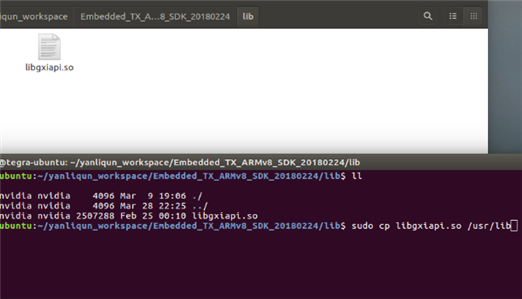
Figure 1 Copy dynamic library to /usr/lib
b) Compile examples
If ARM processor is ARMV8 architecture, the example programs are located in / Embedded_ ARMv8_SDK /Sample
Each example program directory includes a makefile for compiling the example. Each example must be compiled before executing it. You can use 'make' command to compile the program in the example directory.
Using command:
$ make
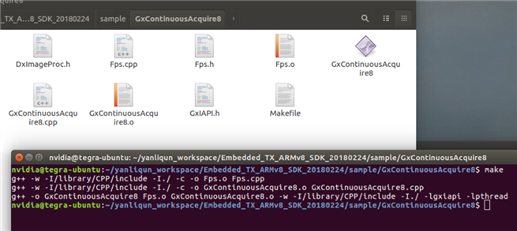
Figure 2 Compile examples
c) Execute examples
After compiling the program successfully, you can run the program in the current directory. But it is worth to be noticed that you must change user permission to administrator for executing the program.
Using 'sudo ./' command to execute the program in administrator mode.
$ sudo ./GxContinuousAcquire8
If the 'GxContinuousAcquire8' program run successfully, some texts will be printed as following.
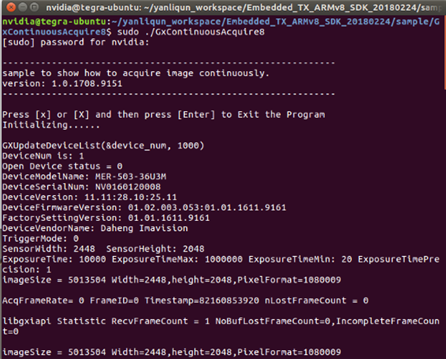
Figure 3 Execute example
Address:12F Daheng Science & Technology Tower, No.3 Suzhou Str., Haidian District, Beijing China
E-mail:isales@daheng-imaging.com